Showing posts with label google. Show all posts

Monday, August 4, 2014

Guest Article: Google Classrooms and Beating the RUT

In this weeks installment of guest posts, I have found two, GREAT articles from blogs of fantastic educators. 

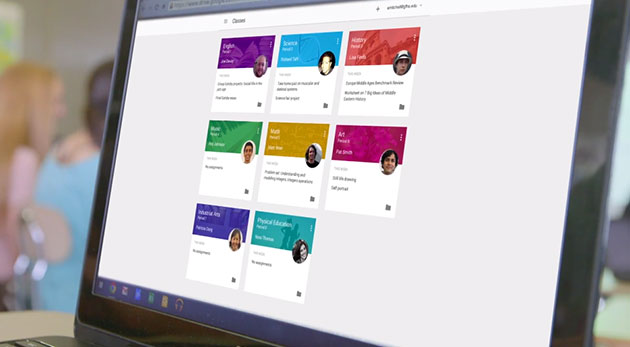
First up, have you heard about Google Classroom? No? WHY NOT? 

Seriously, Google Classroom is going to be the game changer in education when it comes in intergration with Google Apps for Education. But don't take my word for it. Check out what Bethany Petty wrote:


Teaching with Technology: Classroom by Google is AWESOME!: I finally got my invitation to join Google Classroom! Have you? I never thought it would arrive! Of course, I dove right in...literally I ...


Next up, a great, though provoking post by Tony Sinainis about the upcoming school year and what you can do to get motivated for it and to get yourself out of the summertime blues and sadness. Tony is an award winning principal in New York who focuses on motivating learners to be their best and who they are. Check it out. 

Leading Motivated Learners: Rut: Dear Fellow Educators, As I sit down to begin officially preparing for the upcoming school year, there are a lot of ideas and questions...

Finally, a guest Video Post from Hillsborough, New Jersey, the town I live in! Hillsborough is doing some wonderful things with Google and with their Chromebook and Nexus tablet initiatives. They have put out a few great videos documenting how they use it and this one is right up there. Its all about using Google Forms for Math!

Can't wait to send me kids to school here!


Friday, December 20, 2013

What a year! 2013 in Review


What a year it has been, huh? From going to my first #edcamps to wearing a pair of Glass, this year in edtech has been something of a whirlwind. It all started last January at the annual Techspo presentation, where I was able to present and meet some great folks, including +Jeffrey Bradbury. I will be presenting again this year and I can't wait to see how that helps me kick off 2014 with a bang. 

I want to thank all of those who made a difference in my life this year and helped me grow as a educator and a person. Even though I was on Twitter for a few years, this year took it to a whole other level. Never in my life did I think that I could make friends, colleagues, and compatriots on the twitter-verse, but I did and many of them I can truly call friends now. Heck, I even ran a 5K with some of my #njed friends, most of whom I had never met face-to-face before. 

To cap off the year, I was promoted to Supervisor of Instruction in my district! A honor and one that is certainly humbling. While my primary mission to serve our district with the best technology will not change, my aim and focus will become more precise. I will work even more with my teachers and students! That is something I can't wait for! I will be able to visit even MORE classrooms. 2014 is shaping up to be a pretty good year so far. 

As for resolutions, I resolve to follow my mantra:

Be attentive, vocal, and present. Be willing to be there for those who need you. Help in any way you can. 

Be an #agentofchange in anything that you do. 


Thursday, October 10, 2013

Why I Fail.

Have you ever had a day when everything went right and you just patted yourself on the back when it was over?

Yeah, those days are few and far between. Often, if you are like me, your days are filled with a roller coaster of emotion as you hit each peak and valley. Some hours are filled with elation and you reach a goal and hit your mark, while others are filled with dread and contempt. 

Yesterday, I experienced something that I had not felt in a long time. FAILURE. 


Here is the set up: 

I was trying to teach a group of fifth graders about two software programs on iPads. One was a cloud service that enables classrooms to go paperless. The other, well, is Google Apps. I have prepared and I know my stuff, or at least I thought I did. As a teacher for over five years, I knew how to interact with students and help them out but for some reason, the wheels came off.

The kids got the tech, knew how to use the iPads, but when I tried to open a document in one app from the other, it stalled and they couldn't edit it. The kids lost it. Rather, I lost the kids at this point. Well, that was the whole point of the process. I saw the teachers face and after a bunch of kids tried and it wouldn't work, she pulled the plug and decided to do it with pencil and paper. As a sullenly walked about to my office, I felt something that I hadn't felt in sometime - utter FAILURE.


This failure felt like a jab in the stomach. I saw the teacher later, apologized that it didn't go as planned and thanked her for letting me try. I know why she puled the plug, and I don't blame her one bit. This was the second time she tried it. It didn't go well both times.

Teachers today don't have time to experiment and fail. They have SGO's they need to hit. The have new standards that need to be taught and mastered. They have new tests to get their students prepared for. They have 1001 things they are working on that to deviate from the plan and try things is hard. There is just no time at times and many districts don't allow for that flexibility because there is so much pressure on testing.


My failure to make that tech work or to make that class period successful was painful but I am determined not to give up. Real learning happens when you buckle down, figure out what went wrong, and TRY AGAIN. If Edison had given up on making the light bulb, well then I guess we would be reading this blogs in candlelight.

I saw that teacher in the hallway today and let her know that while that tech and ideas maybe didn't work, that she shouldn't give up faith on Google Apps and Ebackpack individually yet. They are great products that can really save you time. I let her know that I will work hard to find something that works well in her class and for her students. And you know what? She came back to me at the end of the day and let me know that she wanted some iPads in her room to help with leaning.

Why do I fail?

I fail because I love to succeed.

I fail because I know that it is the FIRST ACTION IN LEARNING.

I fail because I am human.


Friday, September 13, 2013

The return of the blog! (2013 Edition)

After taking the summer off to relax and work on other projects (such as grad courses, raising baby, and you know, going to the beach), the blog is back and better than ever.


School started two weeks ago now (wow, where did the time go) and thinks have gotten off to a heinous pace. After a rocky start in which some things went down the night before the first day of school - because really, why wouldn't they - we rebounded and are making sure the students, teachers, and classrooms have what they need to succeed.

Another year under the belt means something else to me though - knowledge. Last year, we were working in new territory. We understood what needed to get done but not necessarily the best way to do it. Somethings we got it done quickly, other times it was a pain. But we learned. We failed. We grew.

I am happy to report that we have grown a lot. So much so, that we are rolling out a lot of new projects and products this year. Not only are we going to pilot a Bring your own Device initiative at our 5-8 Middle School, but we are also going to prepare for a PARCC test pilot, 1:1 pilot at the lower grades, and an expanded network to handle the load. It is going to be a crazy year.

That is why I came up with the GBTPS Technology Institute for the 2013-2014 school year.
I will be running, with hopefully many special guests from within and outside our district, a bunch of great workshops that are aimed at truly bridging the gap for EDTECH in our schools.


Take a look and let me know what you all think! If you want to be a part of a day, I would love to have you be a part of it and share what you do in your classrooms or schools. Please hit me up here or on twitter @MrCsays

Until next time, Carpe Diem folks.

Friday, May 10, 2013

App-O-Da-Week #6

Back by popular demand.... it's the App-O-Da-Week!


Thanks to all those who have been supporting this great movement over the last month and a half. It makes writing this and bring apps to you folks fantastic!

Again, because of the demand, we are bringing you not one, but TWO apps. One paid. One free.


Starting with the PAID, let's focus on an app that is breaking waves in education. It's allowing students to explain, well, basically everything. And wouldn't you know it, the app is called "Explain Everything," and for $2.99, it certainly does much more than that.


Folks are calling this one a game changer. Explain Everything allow a student to annotate, create, screencast, and share everything from anywhere. When they are done, they have the ability to upload it to one of many services we currently have, including E-Backpack or Google Drive. 

For those who want a more "techie" answer about what this app does, just look to what the maker, MorrisCooke, says about it:


"Explain Everything is an easy-to-use design tool that lets you annotate, animate, and narrate explanations and presentations. You can create dynamic interactive lessons, activities, assessments, and tutorials using Explain Everything's flexible and integrated design. Use Explain Everything as an interactive whiteboard using the iPad2 video display. Explain Everything records on-screen drawing, annotation, object movement and captures audio via the iPad microphone.  Import Photos, PDF, PPT, and Keynote from Dropbox, Evernote, Email, iPad photo roll and iPad2 camera. Export MP4 movie files, PNG image files, and share the .XPL project file with others for collaboration."


WOW - that's alot. It means that students aren't only creating, they are redefining and sharing what they have learned with others in a way that was never before possible. When looking at the SAMR scale of technology use in classrooms, this app is way up there at the top.


Eventually, students will be able to use this app to create fantastic screencasts of their work, share it with their teacher (who in turn will give feedback and give it back to the student) all in one fell swoop. No computer necessary!


With Common Core become law, there a ton of technological aspects in here that can be used to your advantage. Remember, Common Core has a lot to do with technology and assessments and wouldn't you know it, students can actually use this app as an assessment tool. Teachers can record their lesson plans, activities, and even them reading to the class all in this app.

There aren't many killer apps out there but if there is one that needs to be purchased right away, this one is it.


Friday, April 12, 2013

App-O-Da-Week #2

Back again, huh? Still looking for those great education apps? (You know there are over 40,000 of them in the iTunes App Store).

How the heck are you supposed to find an app in a haystack the size of that?!


Never fear - The APP-O-DA-WEEK is here!!!


In conjunction with our great #appyhour discussion on Twitter (Fridays @2pm est) (Shameless plug) - we again, have broken down the apps that you most talked about and most revered. 


The discussion this week centered around Reading, Spelling, Grammar apps to use for ELA (or LAL, or English for those who remember when it was called that) class. 


With so many great apps to choose from, it was a tough choice - though a last minute RT (re-tweet) helped to sway the judges (me). 


And the winner is.....


READING RAINBOW - you don't have to take my word for it, but read on if you do!


Wait, don't you mean the show that was on PBS for over two decades? Yes, I do mean that one. Mr. Burton and the crew are off TV now but have jumped into the mobile fray.

As the Huff Post Tech wrote: "Switching over to the tablet may prove beneficial for advocating literacy with today's younger generation. According to the New York Times, 46 percent of children ages five to eight use a computer more than once a week and 50 percent of children under eight have access to a mobile device."


The app allows teachers and parents to monitor progress and check out books. Unfortuantly, the app isn't free but for 150 books and 16 video "field trips", parents can pay $9.99 a month or $29.99 for a six-month subscription to receive unlimited access to frequently updated content.


To check out more about this app, hit up: http://www.rrkidz.com/

 To download the app, hit up: https://itunes.apple.com/us/app/reading-rainbow/id512350210?mt=8
   For educators, there is even some plans that go along with it, hit up: http://www.rrkidz.com/educators


And those of you who just want to hear the old theme song - this one is for you


Friday, April 5, 2013

#appyhour 4/5/2013 - Productivity and Organizational Apps for Education!


  1. Be on the look out for my #appyhour tomorrow where we share our fav Ed apps! 2 pm ttmrw #agentofchange
  2. Be on the look out for my #appyhour tomorrow where we share our fav Ed apps! 2 pm ttmrw #agentofchange
  3. T minus four hours until our first ever #appyhour - we will be talking about ed apps for the iPad join us at 2pm est #edchat #njed #satchat
  4. Tweeting about ed apps during our #appyhour today at 2pm est. Chat will be stored and shared for those who can't make it #edchat #njed
  5. #appyhour today will focus on organizational/productivity apps for teachers and students! Bring your best apps to share #edchat #apple #njed
  6. T-minus one hour until the debut of #appyhour - talking about ed productivity organizational apps for Ts and Ss - join us! #edchat #njed
  7. T-minus one hour until the debut of #appyhour - talking about ed productivity organizational apps for Ts and Ss - join us! #apple #ipad #app
  8. 30 mins until you can relax with our #appyhour - use the hashtag to join us talking about ed organization/productivity apps #edchat #satchat
  9. 30 mins until you can relax with our #appyhour - use the hashtag to join us talking about ed organization/productivity apps #edtech #njed
  10. @MrCsays #appyhour I love my dropbox app--across multiple devices/platforms!
  11. Welcome to the first #appyhour - where educators will share what apps they find relevant and appropriate for school and home use!
  12. Welcome to the first #appyhour - where educators will share what apps they find relevant and appropriate for school and home use!
  13. #appyhour - today we will look and talk about organizational and productivity apps for teachers and students
  14. #appyhour before we start - some housecleaning, just state your name and what you do to help share with fellow educators!
  15. @jhengstler #appyhour - I love dropbox too - great app, gives your all your files plus free storage! Who doesn't love free!
  16. #appyhour jhengstler--educational technologist & instructor in Faculty of Education working w/ students & professors