Showing posts with label App O Da Week. Show all posts

Friday, June 7, 2013

App-O-Da-Week #10

With only a few weeks of school left, now is a PRIME TIME to learn about some primo apps! 


Many of you have heard of Brain POP. If you haven't, it's a fantastic, educational site that contains a plethora of content and curriculum. From videos, activities, and quizzes, if you can't find the topic on Brain POP, then the topic just may not exist. Brain POP has a few sites too - including one for K-3, 4-8, ESL, and Espanol!


The drag is that you need to pay for this program but that hasn't stopped them from putting out there Featured Movie App. The App can be found in the Apple iTunes Store, the Google Play Store, and the Chrome Web Store. When you can find an app in more than one place, you know it is something that can be  all teachers and students can enjoy.

Brain POP summarizes there app:
"The BrainPOP Featured Movie and BrainPOP Jr. Movie of the Week apps regularly deliver fresh movies, quizzes, and bonus features right to your handheld device. They cover a breadth of relevant topics including current events, historical figures and milestones, holidays, curricular subjects, and more."


Commonsensemedia.org lays it out pretty well what students can learn in 3 minutes: 
"Kids can learn the main points about a range of different topics -- science, math, social studies, art and music, language, and more -- through brief videos. For example, there's a three-minute video on how digital animation is made. The app features one video every day (although kids can browse topically to watch others anytime), and kids can take a quiz after each video. Quizzes are designed to help kids not only retain the content in the videos but also practice vocabulary and reasoning skills. BrainPOP Featured Movie provides well-presented material on many topics that kids learn about in school."


So there you have it! Two apps for you to digest this week. Please share these with any and all students, teachers, and educators that you know! And remember, same App time, same App channel next week!

Friday, May 31, 2013

App-O-Da-Week #9

After nearly two months of posting this column, I have realized something very real and very important.


Educators LOVE free stuff. They love the f-word (no! not that one).

I have been posted about paid apps over the last few weeks and while they aren't the most expensive things in the world (think of them like a grande cup of Starbucks Hazelnut Frappe Mocha-chino) they are still $$$. And when it comes to $$$, people can get nutty. 


That's why I decided to focus on an app that promotes FREE APPS. This post is like picture inside of a picture inside.. well you get it. 


The app is called AppsGoneFree - which is pretty self explanitory. You can download it for free and it is a great tool. With over 700,000 apps in the iTunes store and over 50 Billion downloaded (lucky person who was the 50 billionth download got a $10,000 iTunes giftcard! They do not need this app) it can be hard to sort through apps that are worthwhile and that are free. 


This app does just that. It posts daily apps that are free. They pick between 5-10 apps that have been reduced to the sultry price of ZERO and let you know all about them. They also post their ratings as well. 


Don't believe me? Here is their description:
Find great apps without spending a dime! Get high quality paid apps for free each day. Unlike other apps, we offer no paid listings - these are expert-picked top-ranked apps, for FREE! 
** 2012 Best App Ever Award Winner

Every day hundreds of apps reduce their price to free for a limited time to try to stimulate excitement. AppsGoneFree finds ONLY the apps worth owning:

* Our AppAdvice.com app experts personally handpick ONLY the best apps. If it's on the list, it's worth owning. 
* These same experts write a quick summary to tell you about the app, and why you need it (or if you don't).  Not PR, honest personal advice.
* We filter out the junk. Don't waste your time looking at all the free apps generated by robots, scouring through them to find something worth downloading, let us do the work for you. 
* It's an honest to goodness human-curated list of the best free apps each day (about 5-10 each day). 
There are dozens of apps that provide long tedious lists of every single app that ever goes free or short lists of apps that paid a lot of money to be included.  But only AppsGoneFree gives you authored, handpicked recommendations from an AppAdvice.com app expert of apps that belong on your device.  

Unfortunately, free apps don't last forever and when they do go back up in price, the app will let you know that the deal has expired. Some of these apps are worth over $10 each. It is a great investment and a way to find new apps for you to use in your classroom and for personal use. 

Friday, May 24, 2013

App-O-Da-Week #8

I am a huge fan of motivation. While some students come into your class ready to rock and roll, others don't. That's the nature of the game. Every student is different and that's what makes this job great.

As teachers, we are armed with many different tools to reach our students. We don't necessarily need to be an expert in them all but we at least need to know that they are there; ready to be used to reach a student who needs a bit of extra motivation or re-focusing. I've seen teachers bend over backwards (literally, there was a science teacher in an district that would use this as a motivational tool) to get the attention of students. I've seen behavior charts, lines, colors, etc. also used to help students stay on task and become motivated positively to help others, go out of there way, and participate.

Behavior management is often on of the few tools that people say isn't really taught in college prep courses - it has to be learned on the job.

Well, for those who want some help... there's an APP-O-DA-WEEK for that! 


Actually, there is an app and a website - it's called Class Dojo. And if this is the first time you are hearing about it, well then you are in for a treat. 


Class Dojo is a behavior management system that allows you to set up your class, your behaviors (both positive and negative) and it gives the teacher the ability to award points in real time to students. They can see their points and actively work harder to achieve more positive points, which are attached to their avatars. Daily reports can be generated to send to parents and students can go in to personalize their avatar they way they want to!


The free service operates on the Web, allowing teachers to use a laptop, desktop computer, or any smartphone or tablet via Web browser. To date, over 3.5 million teachers and students have used the service and over 50 million feedback points have been awarded.

The platform has seen incredible viral growth with 20 thousand new teachers adopting the platform each month, as teachers spread ClassDojo by word-of-mouth and through social media channels.


Once you take the time to set up your class on the website, you can start to use the app, which is FREE. You can use either the pre-set behaviors or you can add your own. You can be as creative as you want. Once you set that all up, you are good to go. Teachers can have the screen loaded up before the students get to class and using an iPad and AirPlay, they can walk around the room, giving out points to students. It could be group work, individual work, or just creating a positive classroom, the app gives you the range and mobility to show students how they are doing in your class. 


If you want, you then can give students access to customize their avatar the way they want. That is up to you.  


They are constantly updating the site as well. They have now put in a timer and other stats for you to use. Check out some of their videos which is linked to their site or their YouTube page.


Jessica Pack, from packwomantech.com, also has some good advice - 

Teachers are able to print out reports and graphs of student behavior using the website.  This could be especially important to Special Education teachers or those who have students with behavior support plans.  

Students can log in and view their own behavior progress.  If you want to enter your kids one by one into the system, then you can issue each student a username and password.  This can do wonders to increase ownership over behavioral choices and also offers a cool home connection. 


All in all. you don't need to know all the tools - just know that they are out there. 


Friday, May 17, 2013

App-O-Da-Week #7


It's that time of the week again!

It's APP-O-DA-WEEK time! 

Thanks for coming back! We are going for nearly two months now. We have brought you both paid and free apps but this app is a bit different... it's both. 


The app that we will be highlighting this week is called "Puppet Pals."


Now, this app is free but to access all the content, you do have to pay for an upgraded version. These apps are generally refered to as "freemium apps" because they rope you in the the FREE word but then make you purchase more to access everything you want to. 

You might be saying to yourself that this is a waste of a FREE app - and most times, you would be correct. But, I would also argue that the paid version of Puppet Pals, which is $2.99, is well worth the investment. The full version is called "Puppet Pals Directors Pass" and you get a lot with it. 


This app allows you to create free puppet shows with user created or app created content. You can do voice overs  move characters around, and create some seriously wicked presentations! The app is easy to use and is one of those creation and collaboration apps that can be scaled for any age group from grades K-12.

Here is how the app makers describe their own app via http://tinyurl.com/a9deaat:

STAR IN YOUR OWN CARTOON in this creative, award-winning app!

Kids and adults alike love the simplicity of puppeteering and voicing characters while creating movies to share.

Simply pick out your actors and backdrops, drag them on to the stage, and tap record. Your movements and audio will be recorded in real time for playback later. 

This app is as fun as your own creativity. Act out a story of Pirates on the high seas, fight as scary monsters, or play the part of a Wild West bandit on the loose. You can even combine any characters however you want! 

Your creations are only limited by your imagination!

FEATURES 
- Create an actor from a photo
- Use a photo as a backdrop for your storytelling
- zoom and rotate your characters using two fingers
- flip them around with a double tap
- a wide variety of creative characters to download (including famous talk show hosts and politicians)
- limitless possibilities of story creations


All in all, its a pretty great app. Students can get engaged and tell stories using premade characters or they can take pictures and put themselves in the story! Other in app-purchases may set you back some but the basics should keep people coming back!

Friday, May 10, 2013

App-O-Da-Week #6

Back by popular demand.... it's the App-O-Da-Week!

Thanks to all those who have been supporting this great movement over the last month and a half. It makes writing this and bring apps to you folks fantastic!

Again, because of the demand, we are bringing you not one, but TWO apps. One paid. One free.


Starting with the PAID, let's focus on an app that is breaking waves in education. It's allowing students to explain, well, basically everything. And wouldn't you know it, the app is called "Explain Everything," and for $2.99, it certainly does much more than that.


Folks are calling this one a game changer. Explain Everything allow a student to annotate, create, screencast, and share everything from anywhere. When they are done, they have the ability to upload it to one of many services we currently have, including E-Backpack or Google Drive. 

For those who want a more "techie" answer about what this app does, just look to what the maker, MorrisCooke, says about it:


"Explain Everything is an easy-to-use design tool that lets you annotate, animate, and narrate explanations and presentations. You can create dynamic interactive lessons, activities, assessments, and tutorials using Explain Everything's flexible and integrated design. Use Explain Everything as an interactive whiteboard using the iPad2 video display. Explain Everything records on-screen drawing, annotation, object movement and captures audio via the iPad microphone.  Import Photos, PDF, PPT, and Keynote from Dropbox, Evernote, Email, iPad photo roll and iPad2 camera. Export MP4 movie files, PNG image files, and share the .XPL project file with others for collaboration."


WOW - that's alot. It means that students aren't only creating, they are redefining and sharing what they have learned with others in a way that was never before possible. When looking at the SAMR scale of technology use in classrooms, this app is way up there at the top.


Eventually, students will be able to use this app to create fantastic screencasts of their work, share it with their teacher (who in turn will give feedback and give it back to the student) all in one fell swoop. No computer necessary!


With Common Core become law, there a ton of technological aspects in here that can be used to your advantage. Remember, Common Core has a lot to do with technology and assessments and wouldn't you know it, students can actually use this app as an assessment tool. Teachers can record their lesson plans, activities, and even them reading to the class all in this app.

There aren't many killer apps out there but if there is one that needs to be purchased right away, this one is it.


Friday, May 3, 2013

App-O-Da-Week #5

It's Friday, Friday... gotta get my apps on Friday! 

It's the App-O-Da-Week time again and this week we are serving up two apps for the price of one. 

One paid, one free! Two reviews = you win!


First up, we have Sushi Monster. This app was made for Scholastic and is a fantastic FREE app (we love that word) that allows gamers to bone up on the mathematical skills in an entertaining way. Students feed their Sushi Monsters by correctly choosing two numbers that when added or multiplied result in the number that the monster wants to eat. When the monster has been fully fed students move on to feeding a new monster. 

It's fun and addicting!


Our next app is an all time classic. Many companies are taking their most popular books and turning
them into interactive reading apps for a new generation. 
That is certainly the case with "The Monster at the end of this Book" which start, lovable, furry old Grover. 

This was staple in my childhood. We would read this book every night  gestating how Grover would and acting out all the parts. It was great. Now, with this $4.99 book app (which is a steal if you consider how much books cost), you get a great interactive story with real life voice and sound effects!


The Review from About.com lays it out perfectly. "Grover’s expressions, which range from sheer overconfidence to utter dejection, are also a hoot, adding that Sesame Street personality to the tale. His comments are quite Grover-like and amusing as well."

Here are just some of the great features - taken from the iOS store site - 
Funny, furry features include:


• Lively, interactive animation that responds to your child’s touch


• Narration by lovable old Grover himself

--and tapping Grover makes him talk!

• Engaging activities that empower readers to decide how and when to move the story forward—plus encourage kids’ spatial development and listening skills


• Word highlighting to help build beginning reader skills


• Easy-to-follow parent tips for helping kids tackle common fears, reflecting the book’s underlying curriculum messages about courage and labeling emotions

• Bookplate personalization — add your child's name!


I hope this weeks installment will get you through until next week & remember, join me for #appyhour on Twitter @MrCsays


Friday, April 26, 2013

App-O-Da-Week #4

As a good friend and fellow Social Studies teacher once said to me - "In the end, history matters."


Some students dread coming to Social Studies, while others are as excited as can be. 
And while Social Studies (or history if you still teach or call it that) gets NO LOVE on state assessments (I'm looking at you, NJ ASK, PARCC, and anything else), we do get some massive love in the APP world.

So, in this weeks edition of our App-O-Da-Week, we are highlighting the apps that are filled with a bunch of maps and old dead people from history, that's right, the SOCIAL STUDIES APPS.  We will be highlighting two apps this week, one for elementary school students and the other for middle school students. Both apps will deal with Geography.


One of the lost arts today is looking at, and figuring out maps. Well, there is a great app for that!

Its called Stack the States - $0.99 -


While not entirely free (there is a FREE lite version that I would recommend trying before making this huge purchase...) it is a great app that teaches state recognition and capitals and the like in a progression like fashion, unlocking states as they go along. Perfect for kids in grades 1-4. It's fun and addictive, which is the crux of any good educational app. Make it fun and they will want to learn even more!

Even Commonsensemedia.org wrote a nice piece about it! Here is what they said:

  • Help kids search for interesting facts or landmarks in each state to keep learning fun.
  • Plan imaginary visits to state capitals. Map out the trip and sights to see.
  • Encourage kids to dig deeper into the history of their own state, or states where relatives live.


Stack the States has great educational and entertainment value. Kids will fall in love with its ease of use that should keep them entertained and learning. Enough said. Take a look!


The second app is aimed at older students - particularly in middle school. This app is FREE. Yes, we love the word FREE in education and this one is a good one. 

It's called History: Maps of the World. 

The maps are rendered in beautiful HD quality. There are literally hundreds of maps. Even Edudemic thinks its a great app!

"History and geography (duh) collide on this very popular resource, which provides access to maps past and present so users can watch how borders and projections shift over time." - Edudemic, 50 Must-Download Apps For Lifelong Learners

Here are the key features:

- Wide variety of historical displays
- Support for Category/Era view
- Keyword Search
- Displays the source about each map
- Zoom in/out (zoom-in/out with pinch, zoom-in with double tab, and zoom-out with two-fingers tap

A local school district in Alabama came up with this great video on the App - check it out!


I like this app because it gets to the point - there is no need for an Atlas. Students have historic, geographic, and others maps at their fingertips. 


So, for our recap:

App #1 - Stack the States - $0.99

App #2 - History: Maps of the World - FREE

While I may be biased on these apps (and oh yes, I am), I think both are great pickups that will enhance learning and won't cripple your wallet. 

Remember - in the end, HISTORY matters. Plus, we rock.


PS - join us on Twitter for this gem of a chat!


Thursday, April 18, 2013

App-O-Da-Week #3

In a galaxy, far, far away, there was this blog. And on this blog, there was this weekly post. And in this post, there was a review of an app that can be used in education.

(cue scrolling text).....


This week in our APP-O-DA-WEEK segment, we are going to discuss and review an app that will make even Trekkies jealous, its STAR WALK.

When I went to school, one of the best parts about learning science was astromnomy. For most kids today, that is still one of the best parts. Learning about planets, moon landings, stars, and places they have never heard of, let alone will ever visit or see.

With Star Walk, the Milky Way gets a little bit closer and more personal than ever before.


What Star Walk does is it allows the user to open up the app and point the device towards the sky. With some really intuitive engineering and real time GPS functionality, it can pinpoint where you are and transpose the nights sky onto your device. 

It will allow you to see everything that is up there (besides UFOs), Constellations; Solar System, Deep Space; Stars; and Satellites.

For $2.99 - (I know, two paid apps in a row? What are you doing to our wallets?!?), it is a steal and a great addition to the classroom for students who want to gaze at the stars during school. The best part? No internet or wifi is required. Star Walk shows visually appealing maps of the heavens (in the direction you're pointing your iPhone when Star Spotter is enabled), and has social media integration, image galleries, and more. 


Here is the official app description: 

Star Walk is an award-winning Education app that allows users to easily locate and identify 20,000+ objects in the night sky. The 360-degree, touch control star map displays constellations, stars, planets, satellites, and galaxies currently overhead from anywhere on Earth. Highly praised and the winner of a 2010 Apple Design Award, the latest update allows users to enjoy unprecedented eye candy and interactivity of the star map, achieved with the new camera and high resolution of the new device. *No Internet connection required*
Latest additions:
The new version includes comprehensive stargazing calendar that shows all visible celestial events for your area, explains their nature and sets a reminder in iCal for ones you chose to see. Other additions include comet tracking and iridium flares.
Augmented Reality allows users to point-and-display the sky as on any device with digital compass and camera. The same mechanism helps calibrate iPhone 4 compass to eliminate error margin completely.
Main Features:
  • Stargazing Community - Twitter integration for iOS 5.1
  • Augmented Reality
  • Satellites Tracking - find out where exactly the ISS is right now! (8000+ satellites)
  • Calendar of Celestial events
  • TELRAD: advanced feature to help you measure angular distance between nearby stars. Can be turned on/off in Settings menu.


Until we can get interplanetary space travel down, use this app! Heres some tunes to get you in the mood while you download it!


Friday, April 5, 2013

App-O-Da-Week - #1

So, you are looking for a new app?

You want it to be easy to use and understand?

You want it to be FREE?!

Well, here you go - after our great #appyhour discussion on Twitter (Fridays @2pm est) (Shameless plug) - we will be pulling the most talked about and loved app of the week for you to all!

The discussion this week centered around Productivity and Organizational apps to use in your classroom for yourself or for your students. When it came down to all the nooks and crannies of the apps talked about, one kept popping up.


Evernote and Penultimate! 

These two apps are both FREE, use the same login and password (great for educators who can't remember one more password as it is!) and helps keep organized and tabs on your students, classrooms, and projects all at the same time. 

You can input pictures from your camera, use the Notability pad as a sketch book for multiple classes, and make folders for all your students work. It takes the place of Office Apps and even Apple apps, like pages. 

Don't take my word for it - check out what +Evernote has to say about it!

http://evernote.com/penultimate/

http://blog.evernote.com/blog/2013/01/31/penultimate-4-the-best-handwriting-app-just-got-better-and-its-free/

And the +The Next Web - http://thenextweb.com/apps/2013/01/31/evernote-penultimate/


 If you are looking to get one free app for organization and productivity, this one is it!


  PS - The ART-O-DA series is something that I used for years with my students for extra credit - will be carrying over the practice when I first saw +Jay Eitner use it in his blog! Got to give credit where it is due!

Best,

Mr. C


Tuesday, April 2, 2013

Why do I need this? - Apples and iPads, a Crash Course


I've always been a proponent of gadgets. Even as a kid, I would fawn over the likes of the "Talkboy" and other toys that I could never, ever get. That was until 2003 when I got my hands on a third generation iPod. With the ability to carry all my music around and not ever have to purchase another CD again (lies, all lies - I just bought a CD last year), it was a revolution in my hand. 

Fast forward ten years, which in terms of gadgets and technology, is light years  and we have come to a common crossroads. Not only can we have gadgets that can hold all of our music, but we can have ones that can carry our lives. Our memories. Our future. iPads, tablets, and touch screen micro-conversion PC's (heck, even Windows 8, I guess), have changed the way we live our lives. We are no longer beholden to where things are in the world because these devices bring the world to us. This is especially true in education. 

We have been test-piloting Apple iPads and iPod touches in our classrooms for the last year and a half. While my inner geek wants to purchase the latest and greatest, I always want to make sure that everyone else feels the same way! The pilots have been going wonderfully - integrating them into different content areas and being use by over 150 students! Even better, we have iPads in our Media Centers that can be taken out for loan by any student - our Media Specialist scans them into the library system and away that student goes!

In any classroom, you need to try things out and play with them before you move forward. My hope is that we can move to becoming a paperless classroom and school. Notes, worksheets, tests, reports should all be delivered electronically and eventually, I hope to move to an electronic book. I understand that there will be a learning curve for the teachers and students who have not yet used an ipad or the specific apps that can be employed. It's important, however, that this process be as painless as possible, therefore, the plan is to introduce the most used apps one at a time. One or two days of practice with the app and then the "app questions" need to be held for the end of class or individual work time. You have to get in there and play around with it - think of this like anything else in your classroom. 

Unfortunately, with over 40,000 educational apps and many more for productivity use, it can be hard to narrow down exactly what apps to choose or which ones to use. Thankfully, Apple and many other sources have made it easy for us to figure this out!


Apple Education Apps - http://www.apple.com/education/apps/
(Good site that breaks down content level apps) (Not only that, but there are collections of free apps as well, which in a school setting, always makes life easier).

(This is a mecca site - loads of information, plus help understanding how to integrate
 i-Products into your classroom).

(Also, this is the site that I pulled the video from at the start and this great poster to hang in your rooms!)

50 Tricks to use with the iPads - http://www.pearltrees.com/#/N-u=1_328373&N-fa=3071669&N-s=1_3147560&N-f=1_3147560&N-p=24674436&N-play=1

More iPad Collections - http://ipadschools.wikispaces.com/home

Even more! - http://teacherrebootcamp.com/2012/12/04/45-teacher-recommended-educational-apps/#.UVh94ljCVtQ.twitter

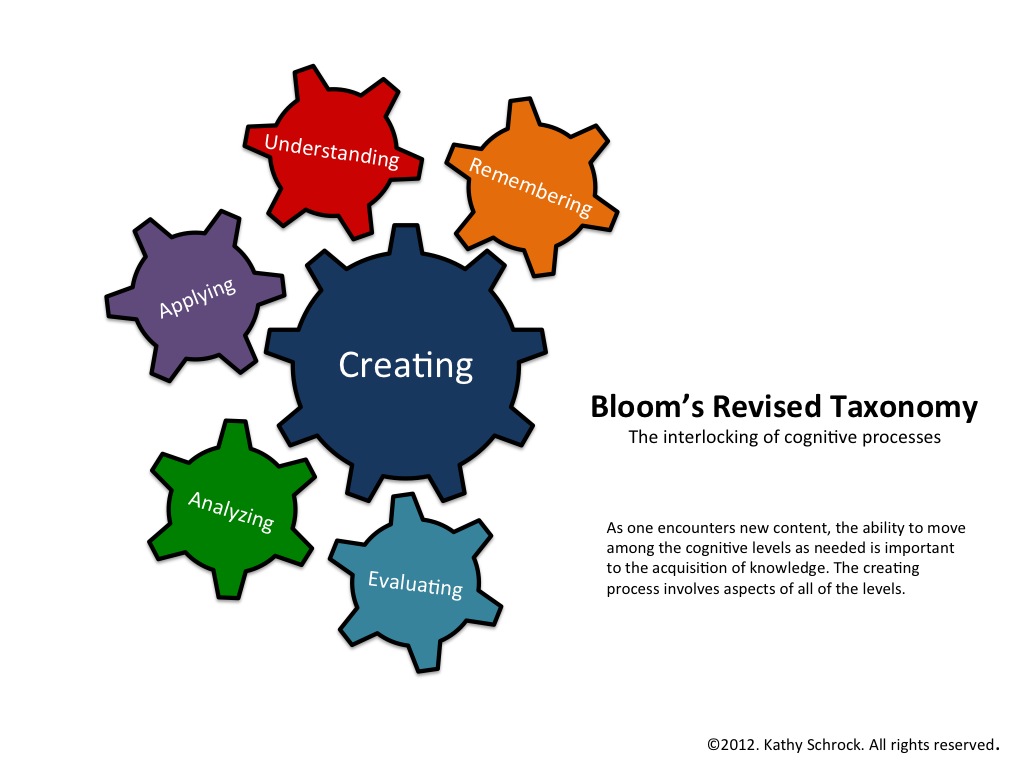
So, what can we take from this? Some people still might ask - how do I use them in my class? Personally, I believe that to be the wrong question to be asking. How can you not? These devices and technology (especially the internet), have flattened the landscape of technology and allow students to learn on a one-to-one basis and can give the teacher more resources to use in front of and away from the classroom. Learning can become personalized with different apps and students engagement (a big, buzz word right now) will spike. As Kathy Schrock labeled it, iPads have revised teaching and learning and even Bloom's! No longer is there a hierarchy  but the cogs are all working together as our students create and learn.


Apple and iOs products can be used daily - they shouldn't be relegated to the side or a one day a week item. There has to be an investment made and a change of heart when it comes to delivery of material. With helpful websites and colleagues (and of course, your local Tech Department), cutting down the App-Jungle will be much easier and more fruitful. 

Be on the look out for the App-O-Da-Week and the App Educator of the Month!