
Be on the look out for my #appyhour tomorrow where we share our fav Ed apps! 2 pm ttmrw #agentofchange
Be on the look out for my #appyhour tomorrow where we share our fav Ed apps! 2 pm ttmrw #agentofchange
@jhengstler #appyhour - I love dropbox too - great app, gives your all your files plus free storage! Who doesn't love free!
Friday, April 5, 2013
#appyhour 4/5/2013 - Productivity and Organizational Apps for Education!


Wednesday, April 3, 2013
Tweet for Tweet - 140 Characters or Less
Some people may call it a bandwagon. Others, a passing fad. Even more may say "what a time waster."
I, on the other hand, believe that Twitter is here to stay. As for bright neon clothes, yeah, those are a fad.
So what makes Twitter that endearing to my heart? Well, for one, I used Twitter to start back in 2008 with my Social Studies classes. My students, in groups, would create fake accounts for Meso-American tribes, such as the Aztecs or Olmecs. They would tweet facts, photos, and stories from their group and they would ask each other questions or answer mine on that platform. Mind you, this was for 6th graders. They loved it and so did I. It was much better than the straight forward report. It was such a hit that I expanded it to my 7th and 8th graders in following years!
Teaching is 24/7 - so is Twitter.
I encouraged my students to follow me on Twitter as well. As a professional educator, I know where the line is when it comes to social media, others, clearly, do not. I modeled a professional social media account by tweeting about educational resources, news, and inspirational quotes. My students could ask me questions publicly about assignments and the like and I could respond to them real time! If they were always going to be learning, why should I be limited to when I had to stop and start teaching.
Education is 24/7 - so is Twitter.
Now, as I have moved out of the classroom and into the Technology Department, I find myself using Twitter for something completely different - Personal Learning Networks.
I participate in chats - from #njed to #satchat (a weekly Saturday morning chat where educators from around the globe participation for the betterment of education and teaching), these chats have given me and others a platform to share and garner ideas.
Learning is 24/7 - so is Twitter.
Now other social media networks have come and gone (sorry, Myspace and Livejournal) and there are some current ones that don't quite mesh with education (Facebook) - but Twitter has the hallmarks to be a good resource for teachers and an even better learning tool for students.
Life is 24/7 - so is Twitter
From Slim Fairview -
Quill Pens and Powdered Wigs in Today’s Classrooms
Twitter's 140 characters are not the end. They are the means.
Thomas writes a draft of the Constitution, he uploads the doc. file to Slideshare: He clicks the T and it uploads to Twitter.
George sees the Tweet, clicks the link and the file appears. He wants to Share this with his Facebook friends around the colonies. He copy-pastes the twitter link to his Facebook page for his friends. His colonial rebellion group page on Facebook. A thumbnail comes up. This thumbnail is a miniature of the doc. file.
John sees this on the group page and clicks the thumbnail. He reads the draft. Under the comments page he adds his views on the matter.
Those who have a problem incorporating technology into the classroom should go back to quill pens, powdered wigs, and candle light. They have no business in the classroom.
Did I hear someone say Visit Williamsburg? I believe there is a website for that.
Regards,
Mr. C
Tuesday, April 2, 2013
Why do I need this? - Apples and iPads, a Crash Course
I've always been a proponent of gadgets. Even as a kid, I would fawn over the likes of the "Talkboy" and other toys that I could never, ever get. That was until 2003 when I got my hands on a third generation iPod. With the ability to carry all my music around and not ever have to purchase another CD again (lies, all lies - I just bought a CD last year), it was a revolution in my hand.
Fast forward ten years, which in terms of gadgets and technology, is light years and we have come to a common crossroads. Not only can we have gadgets that can hold all of our music, but we can have ones that can carry our lives. Our memories. Our future. iPads, tablets, and touch screen micro-conversion PC's (heck, even Windows 8, I guess), have changed the way we live our lives. We are no longer beholden to where things are in the world because these devices bring the world to us. This is especially true in education.
We have been test-piloting Apple iPads and iPod touches in our classrooms for the last year and a half. While my inner geek wants to purchase the latest and greatest, I always want to make sure that everyone else feels the same way! The pilots have been going wonderfully - integrating them into different content areas and being use by over 150 students! Even better, we have iPads in our Media Centers that can be taken out for loan by any student - our Media Specialist scans them into the library system and away that student goes!
In any classroom, you need to try things out and play with them before you move forward. My hope is that we can move to becoming a paperless classroom and school. Notes, worksheets, tests, reports should all be delivered electronically and eventually, I hope to move to an electronic book. I understand that there will be a learning curve for the teachers and students who have not yet used an ipad or the specific apps that can be employed. It's important, however, that this process be as painless as possible, therefore, the plan is to introduce the most used apps one at a time. One or two days of practice with the app and then the "app questions" need to be held for the end of class or individual work time. You have to get in there and play around with it - think of this like anything else in your classroom.
Unfortunately, with over 40,000 educational apps and many more for productivity use, it can be hard to narrow down exactly what apps to choose or which ones to use. Thankfully, Apple and many other sources have made it easy for us to figure this out!
Apple Education Apps - http://www.apple.com/education/apps/
(Good site that breaks down content level apps) (Not only that, but there are collections of free apps as well, which in a school setting, always makes life easier).
Ipads in the Classroom - http://www.schrockguide.net/ipads-in-the-classroom.html
(This is a mecca site - loads of information, plus help understanding how to integrate
i-Products into your classroom).(Also, this is the site that I pulled the video from at the start and this great poster to hang in your rooms!)
50 Tricks to use with the iPads - http://www.pearltrees.com/#/N-u=1_328373&N-fa=3071669&N-s=1_3147560&N-f=1_3147560&N-p=24674436&N-play=1
More iPad Collections - http://ipadschools.wikispaces.com/home
Even more! - http://teacherrebootcamp.com/2012/12/04/45-teacher-recommended-educational-apps/#.UVh94ljCVtQ.twitter

So, what can we take from this? Some people still might ask - how do I use them in my class? Personally, I believe that to be the wrong question to be asking. How can you not? These devices and technology (especially the internet), have flattened the landscape of technology and allow students to learn on a one-to-one basis and can give the teacher more resources to use in front of and away from the classroom. Learning can become personalized with different apps and students engagement (a big, buzz word right now) will spike. As Kathy Schrock labeled it, iPads have revised teaching and learning and even Bloom's! No longer is there a hierarchy but the cogs are all working together as our students create and learn.
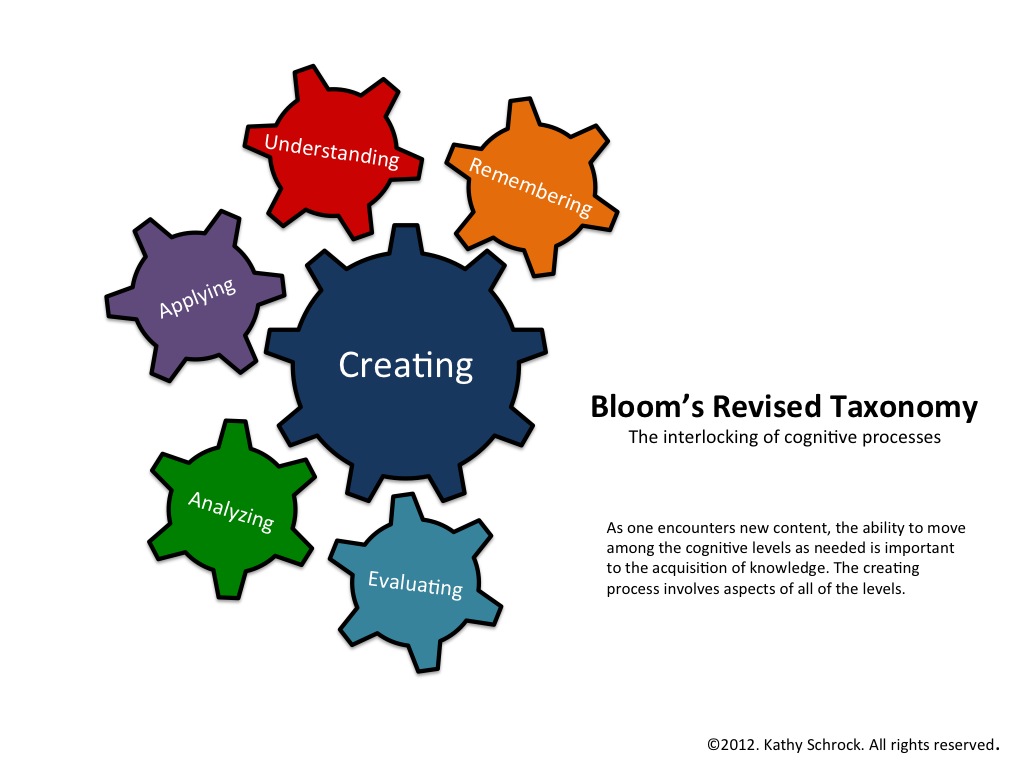
Apple and iOs products can be used daily - they shouldn't be relegated to the side or a one day a week item. There has to be an investment made and a change of heart when it comes to delivery of material. With helpful websites and colleagues (and of course, your local Tech Department), cutting down the App-Jungle will be much easier and more fruitful.
Be on the look out for the App-O-Da-Week and the App Educator of the Month!
For more questions or comments, leave them below or contact me via email at tcharleston@gbtps.org
iPad 2 Wi-Fi 16GB - White (Google Affiliate Ad)
iPad with Retina display Wi-Fi 32GB Black (Google Affiliate Ad)
Apple iPod Touch 64GB 5th Generation - Blue (Google Affiliate Ad)
iPad 2 Wi-Fi 16GB - White (Google Affiliate Ad)
iPad with Retina display Wi-Fi 32GB Black (Google Affiliate Ad)
Apple iPod Touch 64GB 5th Generation - Blue (Google Affiliate Ad)
Subscribe to:
Posts (Atom)